I also have a suspicion that I have been dropped from the
Donations Welcome
I am currently saving toward a new version of Paint Shop Pro. If you wish to help me out, then please donate.
Larger versions of images can be seen by clicking on the image. Also, thank you for your kind and encouraging comments. I love reading the comments. If you use my any of freebies, I would be overjoyed with a comment containing a link to your item. I love seeing any of my freebies in use.
Friday, February 26, 2010
Glitter Butterfly
I'm trying to figure out if I have all my stuff backed up from my old computer. I found this blue glitter butterfly on my backup drive. I'm not sure what I made it for, but I decided to share it. I hope people like it.
I also have a suspicion that I have been dropped from theDigifree/Craftcave search engine because I haven't posted very much.
I also have a suspicion that I have been dropped from the
Tuesday, February 23, 2010
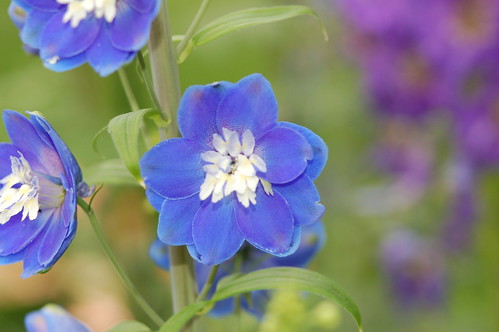
Delphinium Clipart
I have been given a hand-me-down laptop which still needs to have all my graphics software and plugins installed, but it appears to be able to run PSP9 and Photoshop. I will be upgrading to CS4, so all my new tutorials for Photoshop will feature screenshots and instructions for the CS4 Extended version.
I found an old delphinium tube that I made for an alpha back in 2006. I thought I would offer it up as a piece of clipart. I made the tube from a photograph that I took at Longwood Gardens.
I hope that people can use it and I hope to be back to making designer tools soon.
I found an old delphinium tube that I made for an alpha back in 2006. I thought I would offer it up as a piece of clipart. I made the tube from a photograph that I took at Longwood Gardens.
I hope that people can use it and I hope to be back to making designer tools soon.
Sunday, February 14, 2010
Happy Lunar New Year!
My computer is still borked. I do not have any new creations.
This is the year of the tiger. This is an old alpha that I made a couple of years ago. If you want this tagger-sized alpha, you can get it here.
Wednesday, February 10, 2010
Heart Overlays
I made these overlays when I was working on my seamless heart overlay tutorial, but I couldn't make the preview without my computer seizing up. My computer behaved well enough today that I could get it done. The preview is very dull, but at least it is a preview. I really wanted to share these overlays before Valentine's Day so that people could use them.
Tuesday, February 2, 2010
Conversation Hearts Alpha - Pink
I started this post three days ago, but life has been really busy and I haven't been able to finish it. The computer is still flaky. Sometimes it works. Sometimes it doesn't. It may take a month or two for me to save up enough money to buy RAM. Sorry to all of you who like my tutorials, but there won't be any for a while. I hope you all enjoy the last alpha in the conversation heart series.
Sunday, January 31, 2010
S.W.A.K.
The Sealed With a Kiss blog train takes off today. Thankfully, I finished this kit before my RAM died. I used heart templates by Delicious Scraps and scripts by PSPgirl in my kit. I was testing some scripts for PSPgirl and decided the results looked nice enough to keep, so I added them to this kit. My part of the train is a full-size kit containing:
- 7 papers
- 2 journalling tags
- 1 bow
- 3 glitter lips
- 1 round frame
- 1 chain of hearts
- 1 flower
- 5 hearts
- 1 wordart
- 4 alphas
Saturday, January 30, 2010
Conversation Hearts Alpha - Blue
This alpha was actually made two days ago while I was trying to see if my resuscitated computer would continue to function if used with all its guts hanging out. It is a very odd sort of life support to continue functioning while all electronic innards are outside. I wish I knew whether one could draw on the iPad. It is such a cool idea and I'd love an e-reader. If I could do some graphics on it, then it would be a very nice buy. Right now I'm doubtful that it can replace my dying computer.
Friday, January 29, 2010
Conversation Hearts Alpha - Green
I've managed to resuscitate my computer (briefly) by running it with the case open. I'm trying to put it through its paces to determine exactly how much failure it is actually experience. I shudder to think that I have to replace more than just RAM. The computer is from 2005 so I guess it is time that parts started to fail.
Thursday, January 28, 2010
Wednesday, January 27, 2010
Seamless Heart Overlay
This tutorial will show you how to use the offset filter to make a seamless pattern in Photoshop. In this particular case, I will make a seamless heart pattern which can be used as an overlay. This tutorial could easily be adapted to use brushes or custom shapes instead of dingbats. You can also check out my tutorial for a seamless pattern in PSP.
Supplies:
Valentine Dingbats by Kat's Fun Fonts (Freeware, but not commercial use ok)
1. Prior to starting Photoshop, open up the dingbat fonts that you would like to use and minimize the windows. The fonts do not need to be installed. As long as they open, Photoshop will detect them upon startup and they will be available for use. To open a font, find the file, then double-click it.
2. Open a new canvas the size of your repeating pattern. Mine is 600 x 600.
3. Go to the text tool and select the dingbat font. Type a letter and move it to the center of the canvas.
4. Go to the layer menu and flatten the image.
5. Go to the Filter menu and select the Offset Filter (Filter > Other > Offset).
6. Make the offsets half the size of the canvas. Since my canvas is 600 x 600, my offsets are horizontal = 300 and vertical = 300. Set the undefined areas to wrap around. The offset filter will not work correctly if the image has not been flattened. If the canvas is transparent, then the image will not wrap completely around the edges of the canvas.
7. Now the original image from the dingbat font has been moved to the corners of the canvas and the center is empty. Use the text tool and place another dingbat. Use the same dingbat of change to a different one. I changed the color of the font so that the pattern will create a two-tone overlay. I also used the move tool to rotate the dingbat.
8. Define a New Pattern (Edit > Define Pattern). Give the pattern a name.
9. Open up a new canvas the size of your desired overlay. Mine is 3600 x 3600.
10. Fill the canvas with the new pattern (Shift + F5).
The overlay is now complete and you can use it to make a paper. Here is the overlay set to soft light over a pink paper.
Subscribe to:
Posts (Atom)