Donations Welcome

I am currently saving toward a new version of Paint Shop Pro. If you wish to help me out, then please donate.

Larger versions of images can be seen by clicking on the image. Also, thank you for your kind and encouraging comments. I love reading the comments. If you use my any of freebies, I would be overjoyed with a comment containing a link to your item. I love seeing any of my freebies in use.

Saturday, January 22, 2011

Show the Love Blog Train


I haven't done a blog train is a really long time so I thought I would participate in the Starving Artist's Blog Train: Show the Love.  I'm certainly starving, at least.  This is a full-size kit containing:

  • 10 papers
  • 3 frames
  • 3 bows
  • 4 buttons
  • 4 paperclips
  • 4 sequins
  • 1 wire
  • 1 confetti heart scatter
  • 2 vellum hearts
  • 3 conversation heart alphas
  • 1 heart overlay

I'm sorry for the delay in posting links.  Blogger threw an error when I tried to put in the links and then my cold medication kicked in (yes, I'm sick) and I passed out.  There are two links, one for most of the kit and one for the alphas (since some people only want my alphas).

Monday, January 10, 2011

Funky Valentine


I made this for SNL59.  I thought I would share it so that people could use it for Valentine's Day. The kit comes with:

  • 4 papers
  • 4 overlays (as used in the papers)
  • 1 heart arrow
  • 1 journalling heart
  • 1 frame

Sunday, January 2, 2011

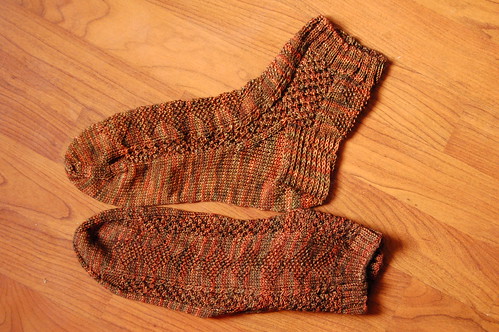
Moss and Bramble Socks

Moss and Bramble Socks

I've been working on writing up the pattern for these socks which I made for my Father-in-Law for Christmas.  The pattern is available as a free Ravelry download.  If you make them in a plain yarn, then the texturing is much more obvious, but I loved this Malabrigo sock yarn and I like how the pattern ends up very subtle due to the variegation in the yarn.

Friday, December 24, 2010

Advent Alpha 24


Ok, here are some sparkly gems to celebrate the end of this year's advent calendar. 

Thursday, December 23, 2010

An old alpha for the Advent Calendar

I think that 4shared has been deleting my files because I'll go to my account and look for a tagger-sized alpha that I made and it won't be there.  Anyways, I liked the suggestion for a snowman alpha, but I don't have time to make one.  So, I'm going to offer up this tagger-sized alpha that I made three years ago.  It is small.  The images are only 0.5 inches in size, but it is 300 dpi, so it is possible to print them.  It uses a tube that I got through a sharing group.


Get the tagger-sized alpha: Snowmen.  And if you want it without the drop shadow, I also have it in gif format.  Yes, it is really old!

Wednesday, December 22, 2010

Advent Alpha 22


Sorry the day is half over before I could post today's alpha.  I'm really busy with holiday preparations.  I didn't really like this bow alpha, but I don't have time to make something better.  Since I was criticized for making different colors, this one just comes in silver.  You will have to recolor the ugly letters yourself.  The zip is available via Skydrive because 4shared is currently down for maintenance.

Tuesday, December 21, 2010

Advent Alpha 21


Taking a suggestion, I tried my hand at making an ice alpha.

Monday, December 20, 2010

Advent Alpha 20


Here is the last minty Mickey Head alpha.  It is sort of cute.  It is also sort of big because of all the glitter.  I don't think I'll be making a green version.

Sunday, December 19, 2010

Starburst Pattern Paper


This tutorial will show you how to make a paper with a starburst pattern in Paint Shop Pro.

1.  Open up a new canvas.  Mine is 3600 x 3600 at 300 dpi for a full size paper.

2.  Fill the canvas with a color using the Fill Bucket.


3.  Create a new layer (Layers > New Raster Layer).

4.  Use the custom selection tool to create a 3600 x 200 selection in the center of on the new layer.


Left = 1600
Right = 1800
Top = 0
Bottom = 3600

5.  Fill the selection with a contrasting color.


6.  Ctrl + D to select none.

7.  Use the Pattern effect (Effects > Reflection Effects > Pattern) to create vertical stripes.  Create as many stripes as desired.  I chose 9 stripes.

Horizontal offset = 0
Vertical offset = 0
Rotation angle = 0
Scale factor = 1
Number of columns = 9
Number of rows = 3
Horizontal shift = 0
Vertical shift = 0

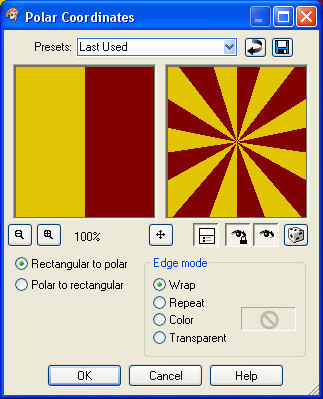
8.  Finish by using the Polar Coordinates deformation (Effects > Distortion Effects > Polar Coordinates) to create the starburst.


Rectangle to polar = Checked
Edge mode = Wrap

Advent Alpha 19


Here are some more minty Mickey heads because I tried a few different variations.